Background Noise Cancellation with Minihost Modular
Have you recently tweaked your audio, perhaps added a compressor, and now your audio quality is poor because your microphone is picking up strange background static, echoes, or...
Have you recently tweaked your audio, perhaps added a compressor, and now your audio quality is poor because your microphone is picking up strange background static, echoes, or other noises? Here’s a quick and straightforward guide to removing background noise when you speak into your mic.
Software Needed#
- Reaper ReaPlugs (Free)
- Minihost Modular (Free) – You’ll have to register for an account to see the download link in the forums.
- Voicemeeter Banana (Free)
Guide#
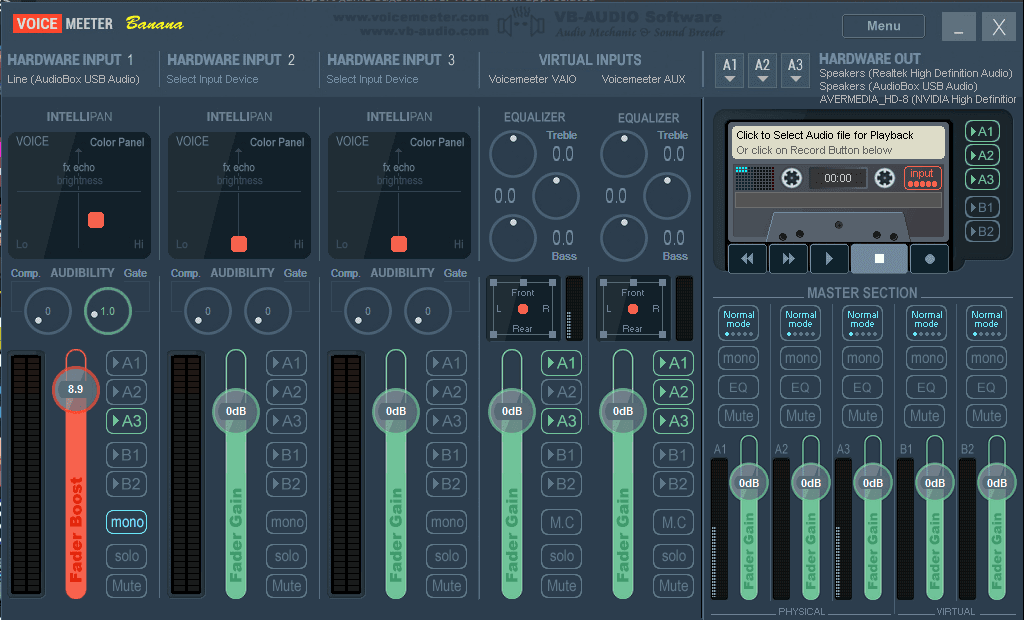
- Follow Rhinehold’s guide for setting up Voicemeeter Banana.
- Follow my guide for setting up a virtual compressor with Minihost Modular (optional).
- Install Minihost Modular and Reaper ReaPlugs.
- In Voicemeeter Banana: Menu -> System Settings/Options. At the bottom where it says ‘Patch Insert’, make sure “in1 Left” and “in1 Right” are turned on by simply clicking on the boxes.
- Minihost Modular: File -> Preferences -> Plugins
- Scan and verify to add the Reaper ReaPlugs plugins into the program
- Back on the preferences page, make sure the ‘Audio device type’ is set to ASIO and your ‘device’ is Voicemeeter Insert Virtual ASIO
- Close out the Preferences window. Right click somewhere in the middle of the program -> Add Plugin -> reafir_standalone
- Connect the left yellow node to the left yellow dot of the program, and the right dot to the right yellow node. If you have set up the reacomp-standalone compressor, you’ll want to connect reafir after the compressor as pictured below. This is important because the connections determine the order in which your sound input undergoes the effects.
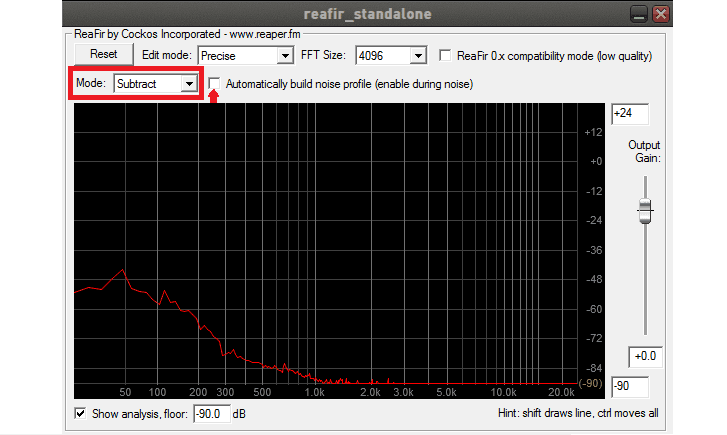
- A new window will appear on your screen now for reafir_standalone.
- Set the ‘Mode’ to Subtract.
- You’re then going to select the checkbox to ‘Automatically build noise profile’. Turn this on for about 10 seconds, do not talk or make any sound while this is active. You should see some movement in the graph as your mic picks up your background noise and sets it as a baseline. The subtract mode uses this profile and removes it from your sound, taking out the background noise.
- If you aren’t satisfied, feel free to keep turning on the tool to try to build the proper profile.
- If you change your audio settings in any way (i.e add a compressor), you’ll want to build a new profile.


That’s it! This handy and simple tool will clean up the background noise when you speak into your microphone.
Written by
Go further
Want a second set of eyes on your stream?
Our consultants have grown channels from a handful of viewers to Partner. Book a 1-on-1 session and get advice specific to your content, your numbers, and your goals.
Meet the consultants